Make sure not to update to iOS 4.3.3 if you need an unlock as one is not yet available!
Step One
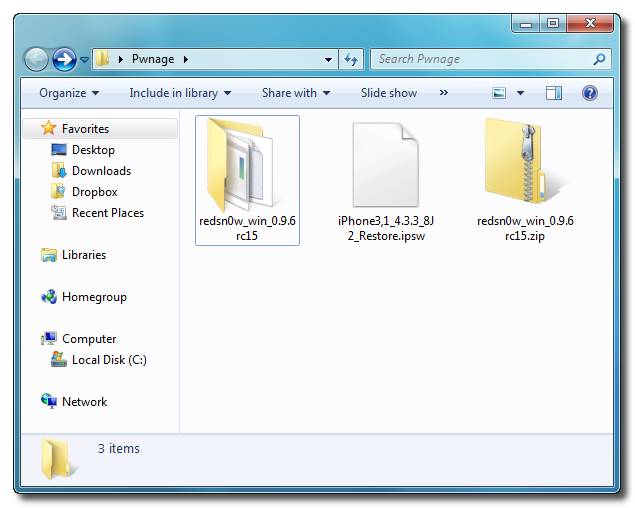
Create a folder on your desktop called Pwnage
Download RedSn0w from here and place it in the Pwnage folder. Likewise, download the latest 4.3.3 firmware from below and place it in the same folder.
4.3.3 (4 GSM): iPhone3,1_4.3.3_8J2_Restore.ipsw
Extract the RedSn0w zip file into the same folder.

Step Two
Connect your iPhone to the computer and launch iTunes.

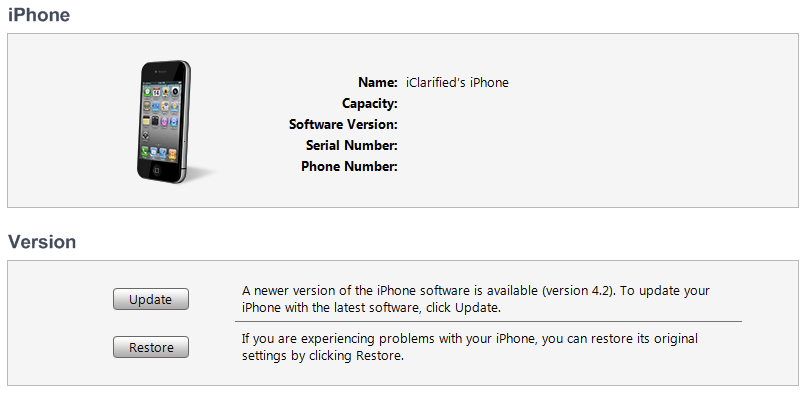
Select your iPhone from the list of devices on the left. Now hold down Shift and click the Restore button. Restore is preferred as it won't create any wasted space on your iPhone.

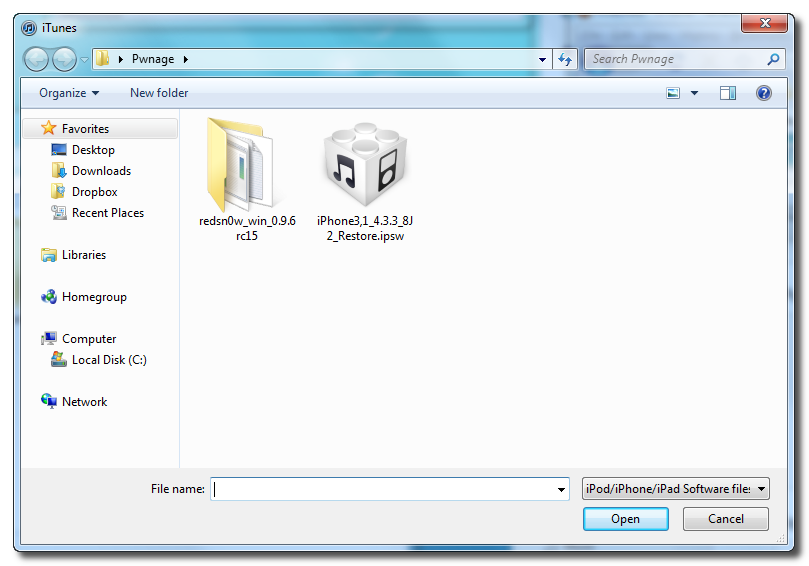
Navigate to the Pwnage folder on your desktop and select the 4.3.3 firmware ipsw. Click the Choose button to continue.

Step Three
Once iTunes has finished updating your iPhone to the desired firmware open the Pwnage folder on your desktop and launch the redsn0w application from the redsn0w folder we extracted earlier.
**Windows 7 users may want to try running the redsn0w executable mode as an administrator in Windows Vista compatibility. You can do this by right clicking the executable and selecting Properties from the contextual menu.

Step Four
Once RedSn0w opens click the Browse button

Step Five
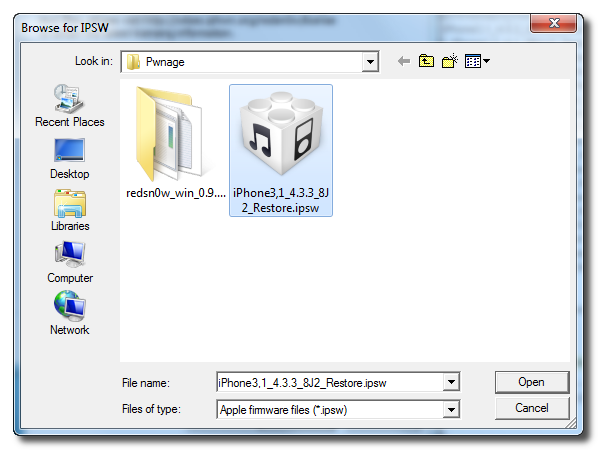
Select the 4.3.3 firmware ipsw we placed in the Pwnage folder on our desktop then click Open.

Step Six
Once the firmware has been verified click the Next button to continue.

Step Seven
RedSn0w will now prepare the jailbreak data

Step Eight
From this window you can select the jailbreak options you would like.
Make sure Cydia is selected and click the Next button to continue.

Step Nine
Please plug your iPhone into the computer and make sure its OFF then click the Next button

Step Ten
RedSn0w will now guide you through the steps to get into DFU mode.

Hold down both the Home button and the Power button for 10 seconds.

Release the Power button and continue holding the Home button until RedSn0w detects the device.

Step Eleven
Your iPhone will now reboot

Step Twelve
RedSn0w will then begin uploading the new RAM Disk and Kernel.

Step Thirteen
Once this is complete you will be notified that RedSn0w is done. Click the Finish button. When your iPhone finishes rebooting (5 minutes or so) it will be jailbroken with Cydia on the SpringBoard.

*As usual a big thanks to the iPhone Dev-Team and I0n1c for their hard work and contribution to the iPhone community.
**Windows 7 users may want to try running the redsn0w executable mode as an administrator in Windows Vista compatibility mode if you experience any trouble.
Step One
Create a folder on your desktop called Pwnage
Download RedSn0w from here and place it in the Pwnage folder. Likewise, download the latest 4.3.3 firmware from below and place it in the same folder.
4.3.3 (4 GSM): iPhone3,1_4.3.3_8J2_Restore.ipsw
Extract the RedSn0w zip file into the same folder.
Step Two
Connect your iPhone to the computer and launch iTunes.

Select your iPhone from the list of devices on the left. Now hold down Shift and click the Restore button. Restore is preferred as it won't create any wasted space on your iPhone.
Navigate to the Pwnage folder on your desktop and select the 4.3.3 firmware ipsw. Click the Choose button to continue.
Step Three
Once iTunes has finished updating your iPhone to the desired firmware open the Pwnage folder on your desktop and launch the redsn0w application from the redsn0w folder we extracted earlier.
**Windows 7 users may want to try running the redsn0w executable mode as an administrator in Windows Vista compatibility. You can do this by right clicking the executable and selecting Properties from the contextual menu.

Step Four
Once RedSn0w opens click the Browse button

Step Five
Select the 4.3.3 firmware ipsw we placed in the Pwnage folder on our desktop then click Open.
Step Six
Once the firmware has been verified click the Next button to continue.

Step Seven
RedSn0w will now prepare the jailbreak data

Step Eight
From this window you can select the jailbreak options you would like.
Make sure Cydia is selected and click the Next button to continue.

Step Nine
Please plug your iPhone into the computer and make sure its OFF then click the Next button

Step Ten
RedSn0w will now guide you through the steps to get into DFU mode.

Hold down both the Home button and the Power button for 10 seconds.

Release the Power button and continue holding the Home button until RedSn0w detects the device.

Step Eleven
Your iPhone will now reboot

Step Twelve
RedSn0w will then begin uploading the new RAM Disk and Kernel.

Step Thirteen
Once this is complete you will be notified that RedSn0w is done. Click the Finish button. When your iPhone finishes rebooting (5 minutes or so) it will be jailbroken with Cydia on the SpringBoard.

*As usual a big thanks to the iPhone Dev-Team and I0n1c for their hard work and contribution to the iPhone community.
**Windows 7 users may want to try running the redsn0w executable mode as an administrator in Windows Vista compatibility mode if you experience any trouble.